• Skip to main content
  • Skip to main content
Choose which site to search.
University of Arkansas for Medical Sciences Logo University of Arkansas for Medical Sciences
Students: Educational and Student Success Center
  • UAMS Health
  • Jobs
  • Giving
  • Student Success Center
  • About Us
    • FAQs
      • Academic Coaching FAQ
      • Peer Tutoring FAQs
      • Presentation Center FAQs
      • Tech Center FAQs
      • Writing Center FAQs
    • Hours
      • Holiday Hours
  • Student Services
    • Learning Services
      • Academic Coaching
      • Peer Tutoring
        • Benefits of Peer Tutoring
    • Tech Center
      • Laptop Lending Policy
    • Writing Center
  • Resources for Students
    • Content Support
    • ESSC Video Resources
    • Learning Support
    • Tech Support
      • Blackboard – How To
      • Blackboard App – How to
      • How do I connect to UAMS Wi-Fi on my mobile device?
      • How do I get email on my mobile device?
      • How to setup my UAMS Zoom account?
      • Respondus Lockdown Browser – How To
      • Software recommendations
    • Writing Support
  • Student Success Blog
  • Request Help
    • Get Help with Your Classes
    • Get help with your laptop or mobile device
      • Request to use a laptop
    • Peer Tutors – Submit a session timesheet
    • Submit your document to the Writing Center
      • Reserve the Presentation Center
  • Quick Links
  • Faculty & Staff
  1. University of Arkansas for Medical Sciences
  2. Students
  3. Educational and Student Success Center
  4. Author: Marybeth Norcross
  5. Page 6

Marybeth Norcross

SSC Open House: Connect with Learning Resources

Are you meeting your goals for academic success? Sometimes, a few simple changes can make all the difference in the way you perform. The Student Success Center was created to support all UAMS students with the resources and services they need to achieve their goals.

The SSC Winter Open House on Wednesday, January 27th is a great time to learn about what we have to offer. Come by between 2:00pm and 4:00pm and take the opportunity to

  • Talk with a Learning Specialist about things like time management, organization, note-taking, study skills, and test taking tips.
  • Ask the faculty in the Writing Center about ways to improve your writing projects.
  • Chat with the Laptop and Mobile Device Support Technician about ways to improve and maintain laptop performance.
  • Try different educational apps and websites to see if they might help streamline your workflow or improve your academic habits.
  • Ask our Testing Coordinators how to make your experience in the Testing Center less stressful and more efficient.
  • Set up a meeting with our staff if you want a more personalized and in-depth discussion about your particular needs.
  • Check out or space and have a cookie.

If you don’t find what you need, tell us what you are looking for. We will work with you to find it. Most of all, we want to get to know you and help you to have a very successful academic year.

SSC Winter Open House

Wednesday, January 27, 2016

2:00pm to 4:00 pm

3rd Floor Library/ED II Building
Filed Under: Academic Success, Student Success Center Tagged With: student success

MeetingWords: Notes and Chat

Note taking is usually a personal effort, with each person acting as a dedicated recorder. But notes tend to reflect how a particular student understands the content. It can make it difficult for the student to see alternate perspectives, or identify gaps in their understanding. Collaborative note taking, using websites like MeetingWords, can help students take more comprehensive notes, and offers opportunities for peer support and interaction while learning new material.

About MeetingWords

MeetingWords is a free online notepad and chat room that allows people to work and communicate in real time. It is simple to use and doesn’t require you to sign up or register. You use it when you need it, and then discard it when you are done.

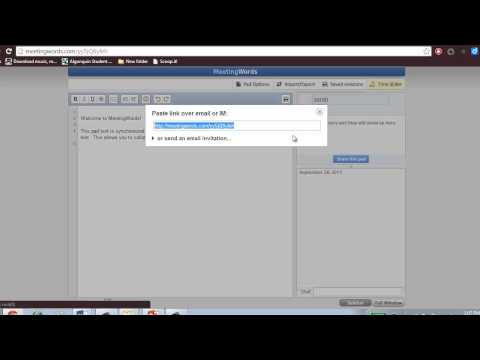
Getting started is easy. Simply go to MeetingWords, click on Create a public pad, and begin typing. Once you are started, you can click on Share pad to get a link you can post publicly or send to select invitees. Take a look at the video below to see how the process works.

Intro to MeetingWords

With MeetingWords, up to 32 people can edit and view your document at the same time. All edits and chat are made in real time, so everyone sees the latest version. All inputs are saved as they are generated, so multiple authors can work at the same time without overwriting another’s changes. Each contributor has a different highlight color, so it’s easy to identify who is making edits.

There are a lot of good reasons to use MeetingWords. It’s easy to set up and use, no registration is required, and it offers opportunities for large group collaboration in real time. You can bookmark your document for repeated use and download it into a savable format when you are finished.

There are a couple of disadvantages with MeetingWords, but for me they aren’t a deal breaker. First, MeetingWords isn’t available as an app for mobile devices, you can only use it through through the website, so you are restricted to using it on laptops, notebooks, and desktops. Second, it is designed for short-term collaboration, so if your document isn’t accessed for seven days it will get deleted. However, since the document is downloadable, I don’t consider this much of a problem.

Using MeetingWords

MeetingWords is a great tool for taking collaborative notes during class lectures, presentations, and videos. It facilitates multiple perspectives about the content, and the chat feature offers students the opportunity for peer support and discussion. Students can ask one another questions and even arrange to meet later for informal review sessions.

MeetingWords is a quality alternative for those times when you don’t have access to or don’t want to use Google Docs. Since it doesn’t require registration or login, it’s a great tool for quick collaboration and informal dialogue during class sessions.

Filed Under: Student Success Center

Academic Resolutions

There’s something about the start of a new year that makes us want to make changes. I think this is why people make New Year’s resolutions. Having a specific start date makes it easier to decide to make changes. A New Year’s resolution can be about anything you want to change in your life. Often, people resolve to change their diet or begin a new fitness routine. Sometimes, they decide to learn a new skill or to travel somewhere they’ve always wanted to visit. Resolutions can be intensely personal, like resolving to spend more time with family, or to repair a broken relationship. The point is, the start of a new year is a powerful motivator to make needed changes in your life.

January 1st falls in the middle of the academic calendar, so people don’t always think about making academic resolutions, but it’s a great opportunity to change something that isn’t currently working for you. Think back over the last semester.

  • How successful were you?
  • Did you meet your goals?
  • Were your goals attainable?
  • How well did you balance your academic requirements with the other areas of your life?
  • Did you manage your time as effectively as you could?
  • Did you work hard enough to achieve your goals?
  • If you worked hard, do you need to find ways to work smarter so you can maximize your study time?

Potential academic resolutions lie in your answers to these questions. If everything is running smoothly, that’s great! But if it isn’t, what do you want or need to change? If Plan A isn’t working, then it’s time to move to Plan B or even Plan C. No plan is ever perfect. You should always be updating and changing your plan based on your needs. What worked for you in the past may not work in your current situation. So, make a new plan and meet your goals for academic success.

If you want some help creating a new plan, the Student Success Center has a wide range of resources to help you find what you need. Visit the Learning Resources webpage to find materials that provide support and guidance. The Writing Resources page is loaded with all kinds of online writing sites that can answer your questions. The Apps, Tools, and Websites page offers a selection of time management, organization, and note-taking apps and websites for students who are looking for tech solutions to managing their academic workload. And if you don’t see what you need, tell us what you are looking for. We will work with you to find it. Stop by our offices on the 3rd floor of the Library or use the Contact Us form to tell us what you need. We want you to have a very successful New Year.

Filed Under: Student Success Center

Take Care of Yourself

With finals over, UAMS students are ready to take some time off and relax. Last week, in the blog, we looked at the negative physical and mental effects of prolonged stress. This week we will focus on ways for you to take care of yourself during your Winter Break.

Habit Seven in Stephen Covey’s book, The Seven Habits of Highly Effective People, is called “Sharpen the Saw”. It involves taking the time to practice self-care, or taking care of yourself. In your academic pursuit you are the most important asset you have, but you can’t continue to perform at your best unless you take the time care for yourself.  So, here are four ways you can do this over the Winter Break.

Take Care of Your Physical Self

No doubt you want to have some fun during your break, but take time to get some rest and relax. You don’t want to return in January more tired than you were when you left.  During the crunch of finals, many students don’t take time for meals or eat enough of the right foods. What you put into your body is important, so refuel your body by making good food choices.  And, make time to exercise. While it is tempting to lay around watching movie marathons on Netflix, exercising consistently for thirty minutes three to six times a week will increase your ability to be proactive when you return to campus instead of reacting to all the outside forces around you.

Take Care of Your Brain

After all the studying and preparing you do before your finals, you may think that you just need to empty your brain for a while. What you want to do is feed it; or more specifically, feed the creative side of your brain. Let’s face it; almost all your finals required you to use the left side of your brain. You had to practice logical thinking, accuracy, and analysis, and all that brain work has left you exhausted. To refresh your brain do something creative. Read a book, just for fun. Write in your journal, or blog, or just a letter to a friend or family member. Paint something, take some pictures, build in Minecraft, sing and dance, or play some video games. Do something that requires you to be intuitive, subjective, random, and creative. Rest the left side and enjoy engaging the right side of your brain.

Take Care of Your Spirit

Taking care of your spirit means to reconnect to your value system and the things that inspire you. This is a very personal form of renewal and people do it very differently. Some people immerse themselves in distinguished literature or surround themselves with great music. Others head outdoors to communicate with nature. Still others refresh their spirit through prayer and meditation. Whatever method you use, take the time to reconnect and recommit yourself to those things that inspire and uplift you.

Take Care of Your Emotional Self

Take some time to heal after the stress of finals. Spend time with people you enjoy: family and friends who make you feel loved and secure. Perform at least one act of service, especially an act of anonymous service, where you will gain nothing more than the satisfaction of helping others. Make a difference to someone else on a small way. As humans, doing something that is meaningful and beneficial to others brings out the best in us and renews our emotional self.

You will find that the best self-care comes through finding the balance in each of these four areas. So enjoy your Winter Break, take good care of yourself, and we will see you when you return in January.

Covey, S. (1990). The Seven Habits of Highly Effective People. New York: Simon and Schuster

Filed Under: Student Success Center

The Stress of Finals: Almost Finished

Just like a runner who catches sight of the finish line and knows he is almost at the end of the race, the arrival of finals week signals to the student that the long semester of hard work is almost over. With the end so close we summon that extra boost of adrenaline to get use through to the end. It’s one of the benefits of stress that helps us do what needs to be done.

One of the drawbacks of stress is that if we stay stressed for too long, it can start to take its toll on our bodies. We weren’t meant to always live under a stress cloud. However, some periods of stress are unavoidable, so it’s important to be aware of how stress is affecting you and find ways to combat it. The video below offers a short lesson on how stress affects our bodies.

How stress affects your body - Sharon Horesh Bergquist

Knowing how stress affects you can help you stay healthy and sharp during your finals week. If you find yourself needing a few quick relaxation tips right now, check out our Relaxation Exercises. Another important step is to start thinking of ways to rest, relax, and renew your mind and body during the upcoming Winter Break. In the next post we will share ways to practice self-care so you can return in January ready for the new semester.

Filed Under: Student Success Center

Connect and Collaborate with Stoodle

The ability to work with others is a critical skill for academic and professional success. However, it can be difficult when you are separated from others due to schedules or geography. Online collaborative whiteboard services can help you connect with your classmates, a tutor, or a teacher at anytime from anywhere, but they are often costly, difficult to set up, and have limited capability for real-time communication. Stoodle was created to provide an alternative.

What is Stoodle?

According to the website, Stoodle is “the ultimate online learning experience”. Basically, Stoodle is a free online collaborative whiteboard service, designed for students, tutors, and teachers to share information. It is an excellent way to connect those with information to those who need it.

Stoodle is simple. It includes just the features needed to make online collaboration with a whiteboard effective and efficient. Those features include

  • Communicate in real-time through voice and text chat
  • Invite any number of people into the session
  • Add whiteboard pages easily
  • Share your whiteboard with others
  • Use basic drawing tools
  • Upload images

Stoodle is  free, doesn’t require an account, and is incredibly easy to use. You go to the Stoodle website and click on Launch Classroom. Stoodle will ask for your name. Type your name in the box, click OK, and your whiteboard is prepared. Stoodle will remind you to send the URL to those you want to invite. It’s that easy. The video below by ER’s EdTech Tutorials gives an good overview of how to use Stoodle.

Stoodle Tutorial

Why Use Stoodle?

Stoodle is such an adaptable tool that it can be used for many different purposes. It requires almost no set-up, so it’s ideal for impromptu review and brainstorming sessions or informal tutoring. Because Stoodle is free, it is open to everyone. It is also ideal for non-traditional students who would like to work with their classmates, but are separated by geography. The Stoodle whiteboards can be used for all kinds of process work, from brainstorming, creating concept maps for reviews, problem solving, or editing writing projects. And you can store your whiteboard sessions to review later.

Communicating with your peers shouldn’t be difficult. Whether you are a non-traditional student or taking classes in a face-to-face environment, Stoodle offers you the opportunity to connect with your classmates, a tutor, or a teacher at anytime from anywhere, at no cost. With real-time communication options, unlimited whiteboard pages, and the ability to save your whiteboard for review later, Stoodle is a terrific alternative to other online whiteboard services.

Filed Under: collaboration, Technology Tagged With: collaboration, online tools, technology

Find Help When You Need It

At some point during your time at UAMS you may need to find help. You might find yourself falling behind in your courses, experiencing financial struggles, developing health problems, or experiencing technical issues with your computer. Students often need help and there are a variety of services in place just for you. Learn about the services that UAMS has to offer. You will be more confident knowing that there are organizations waiting to provide the support you need, when you need it.

Finding Help

Below, you will find links to some of the organizations that provide services to UAMS students. Take time to browse through the list to become familiar with what the UAMS campus has to offer.

The Student Success Center

The mission of the Student Success Center (SSC) is to provide all UAMS students with educational services, programs, tools, and resources to improve their performance and achieve academic success. You can learn more about our services by clicking on the tags in the image below.

Here are a few additional resources at UAMS that are available to assist all UAMS students.

College/Program Faculty and Staff

The Colleges and Programs at UAMS often have staff available to help you with a wide variety of issues. For more information, contact your college.

College of Health Professions

College of Medicine

College of Nursing

College of Pharmacy

College of Public Health

Graduate School

Campus Life and Student Support Services

Campus Life and Student Support Services provides campus housing, plans and organizes intercollegiate activities, and oversees the student government association, intramural sports program, and student insurance. Visit the website to find out how to connect to activities on campus.

Center for Diversity Affairs

The Center for Diversity Affairs works to advance diversity, inclusiveness, equity, and cultural competency in all aspects of the UAMS mission. They are responsible for recruitment and advocacy for the admission and graduation of candidates from underrepresented minority groups. In addition, they support UAMS students from all protected and affected minority and disadvantaged groups to help them be academically successful.

Office of the University Registrar

Duties of the Office of the University Registrar include student records and enrollment for all colleges and academic programs at UAMS.

Student Financial Services

Student Financial Services is divided into two divisions to help serve the students at UAMS. The Financial Aid Office provides information and services to help students searching for different types of financial aid. The Bursar’s Office coordinates the disbursements of loans and financial aid and processes tuition payments.

Student Health Clinic

The Student Health Clinic (SHC) provides UAMS students with treatment of acute illnesses, wellness and health promotion services, and continual health education.

Student Wellness Program

The Student Wellness Program is a preventative service created to provide short term, confidential assistance for UAMS students and to find the necessary tools for students to achieve their fullest potential. Students can find help for depression, anxiety, grief, relationship conflicts, academic difficulties and numerous other issues. The service is confidential and short-term care is provided at no cost. For more information visit the website.

UAMS Library

The UAMS Library is committed to meeting the information needs of our users with responsiveness, professionalism, and effectiveness. The Library provides an attractive and secure environment that is conducive to study, work, research, and learning.

Don’t wait to find help.  Learn about the services that UAMS offers to students. All of these organizations want to help you have a successful and fulfilling academic career at UAMS.

Filed Under: Help for Students Tagged With: finding help, student success

Sharpen Your Study Skills

Good study skills are a requirement for student success. Even if you’ve never had to study much before, you will need strong study habits to meet the rigorous academic requirements at UAMS. Don’t wait until you are falling behind to develop your study skills. Take control and start now.

Take Time to Prepare

Study skills begin before a class session. Students with the best study skills plan for their class meetings. Review your class syllabus and schedule so that you know what content the instructor plans to cover during the class session. Before each class, skim materials like your textbook to get an organizational snapshot of the content. Read the learning objectives, headings and subheadings, and pay attention to charts and graphs. You will be much more open to receiving explanations, details, and facts from your instructor if you have a general understanding of how the topics are connected. Your notes from the class sessions will be more meaningful if you take the time to prepare.

Be Active and Participate in Class

Good study skills are rooted in how actively you listen and participate in your classes. To maximize your ability to retain and understand information, you need to be completely engaged in your learning. This begins with being an active listener. Don’t sit passively and let information drift over you. Instead, take notes and ask questions. Don’t try to write every word. Use short phrases and abbreviations but be careful that what you write is meaningful, because you will need to understand it later when you review your notes and materials. If you ask a question, make sure you can restate it in your notes so that you fully understand it. If you took the time to preview the material for the class session, you will already understand the general outline and organization of the material your instructor is covering which should make note-taking more efficient.

Plan for Reviewing

Good study skills include multiple opportunities for reviewing your notes and materials. Plan to review your notes the same day as your class session, or at least within 24 hours. Reviewing your notes shortly after the class session will allow you to check that you understood the material presented, and that your notes are clear and complete. Mark anything in your notes that you don’t understand. Then you can go back to your resources and find the information you need.

In addition to the same-day review, you will want to schedule study sessions on the days your classes don’t meet, like on the weekends. Use that time to review your notes and materials, re-read portions of your textbooks, summarize information in your own works, make connections between newer and older information, and test yourself through self-questioning and practice questions. Try to schedule some review time with other students in your classes. Explaining the material to another student is an excellent check of how well you understand what you learned. Listening to a peer’s explanation can give you a new perspective on the content as well.

Helpful Resources

The Student Success Center’s website has resources to help you improve your study skills, including information on how you learn and retain information, reading strategies, study strategies, and test taking skills. For more information, visit the Learning Resources page.

You need good study skills to be academically successful at UAMS. Taking time to prepare, being active and participating in class, and planning for reviewing your notes and materials will help make the hours you spend studying more productive and increase your academic achievement.

References

Texas A & M Health Science Center, http://medicine.tamhsc.edu/academic-support/active-learning-techniques/managing-class-content.html

University of Waterloo, http://uwaterloo.ca/counselling-services/curve-forgetting

Filed Under: Academic Success, Student Success Center Tagged With: student success, study skills

Time Management

How Good Are Your Time Management Skills?

Success at UAMS is dependent on time management. You have multiple courses, projects, exams, study groups, and deadlines, and keeping up with them can seem overwhelming. In addition, many students also have to manage family, friends, and a full-time job. Learning to manage all the demands on your time is not just a skill for academic success, but one that will serve you in your future personal and professional life

There are many time management strategies and tools available to you, but most of them center on three components; scheduling, prioritizing, and completing.

Scheduling

Learning to schedule your time is one of the most important steps to learning to manage you time effectively. Get a calendar. It doesn’t matter if it is a traditional hard-copy notebook, or an online calendar you have on your phone or mobile device. Just make sure you have some place to keep track of your coursework. As soon as you can, download the schedules for all your courses and put all your assignments, projects, tests, and deadlines for all your courses on the calendar. Your calendar will give you a clear picture of when you are going to be the busiest.

Prioritizing

Learning to prioritize will help you make certain you are doing the most important things first. Break down your big projects into manageable chunks and work on them a little at a time so you aren’t overwhelmed when the deadline is upon you. Make a to-do list each week, and prioritize your tasks according to importance.

It might help to organize your tasks into three categories: Must Do, Should Do, and To Do.  Work through these in order of priority, and be disciplined about taking care of the most important things first. Just remember, that Should Do and To Do items can become Must Do if they are not taken care of when you have the opportunity. Take satisfaction in checking items off your to-do list. It shows you how much you have accomplished, and motivates you to stay focused and finish strong.

Completing

Scheduling and prioritizing are great for planning, organizing and understanding your workload, but the actions you take to complete your tasks and accomplish your goals are what will make your time management plan a success. Follow the schedule you have created and work through the items on your to-do list. Remind yourself of your goals when your motivation sags, and don’t be discouraged when unexpected interruptions occur. Make sure to reward yourself when you complete a large task or achieve a goal. Your success will be a reflection of your discipline and determination in carrying out your plan.

Find Support

The are many different ways to manage and organize your time and workload. Click here to find information, tips, and tools on the Learning Support page.

Your success in managing your time and tasks directly impacts your success at UAMS. Keeping up with your courses, projects, exams, study groups, and deadlines can be overwhelming without a plan for managing it all. Using a time management plan that includes maintaining a schedule, prioritizing a to-do-list, and completing your work will not only help maximize your academic success, but will help you succeed professionally.

Filed Under: Student Success Center, time management Tagged With: student success, time management

Master the Online Tools

Do You Know the Online Tools?

Whether you are an online student or taking classes in a traditional classroom, most, if not all, of your courses will have an online element. The most common is Backboard, the web-based learning management system used to host online courses and provide supplemental materials for face-to-face classes. But your instructors may use other web-based tools such as ExamSoft, O2, or blog sites, wikispaces, and Google apps to support teaching and learning. Whatever the tools, it is a good idea to become familiar with them and learn how they work before you need them to complete assignments or take a test.

Begin with Blackboard

Blackboard is a good place to begin, because your courses will likely have a Blackboard site. Check out your courses in Blackboard as soon as they are available to get the information you need to plan your semester. Then work your way through the following components.

Navigation

Instructors set up their Blackboard sites differently, so it is a good idea to navigate around the site to learn how things are organized and where information is stored. Chances are you will like some organizational systems better than others, but the key is not to be surprised when you go to find something. The more you explore the more you will master navigating through all of Blackboard’s features. Learn how your instructors label and use folders. Click on the discussion feature to see if your instructor will be using discussions in the course. You can learn a great deal by just touring the site.

Syllabus/Calendar

Two of the most important documents you need to access are the course syllabus and calendar. Don’t let yourself be surprised by the course schedule and requirements. Learn where the calendar and syllabus are, and download.

Course Content

Usually the course content folder or tab will contain most of the materials you need to complete the course. Remember that instructors organize information differently. Some may have everything organized into module sub-folders within a content folder, while others may simply have a series of links in the side navigation bar. This step will be easy if you take the time to navigate through the course.

Assignments/Assessments

Find the Assignments and Assessments folders and see what your instructor has posted. Often, instructors upload assignment instructions and rubrics. You will see how you are expected to turn in your assignments, and how the instructor will choose to administer quizzes and tests.

Blackboard Collaborate

If your instructor intends to have synchronous meetings online, you will see a link for Blackboard Collaborate. Learn how to join a Collaborate session and make sure your browser, virus protection, and software are up to date before you have to attend a scheduled meeting.

Identify Other Online Tools

Many instructors use other online tools in their courses, so learn what they are and become familiar with how they work. That way, you aren’t trying to learn new tools when deadlines become pressing.

Many instructors use ExamSoft for testing. The College of Medicine uses O2 to provide students with a calendar and a host of other information. Some instructors will use other web-based tools, apps, and websites in their courses. Find out what the tools are, and get to know them.

Site Support and FAQS

What should you do if you need help learning how to use the online tools? Support forums, tutorials, and frequently asked questions (FAQs) will help you get started or solve problems.

Blackboard

Blackboard Help Site

Blackboard Collaborate Requirements

ExamSoft Support

O2 (College of Medicine)

Student Success Center Tech Support

Mastering the online tools you will use in your courses is a good way to help maximize your time. Whether you are a traditional student or taking courses online, you will have to use a variety of online tools in your academic career. Whatever the programs or tools, it is best to know how they work before you need them.

Filed Under: Academic Success, online learning, Technology Tagged With: online tools, student success, technology

  • «Previous Page
  • Page 1
  • Interim pages omitted …
  • Page 4
  • Page 5
  • Page 6
  • Page 7
  • Next Page»
University of Arkansas for Medical Sciences LogoUniversity of Arkansas for Medical SciencesUniversity of Arkansas for Medical Sciences
Mailing Address: 4301 West Markham Street, Little Rock, AR 72205
Phone: (501) 686-7000
  • Facebook
  • X
  • Instagram
  • YouTube
  • LinkedIn
  • Pinterest
  • Disclaimer
  • Terms of Use
  • Privacy Statement
  • Legal Notices

© 2026 University of Arkansas for Medical Sciences